Capital Device Modeler, rebuilt
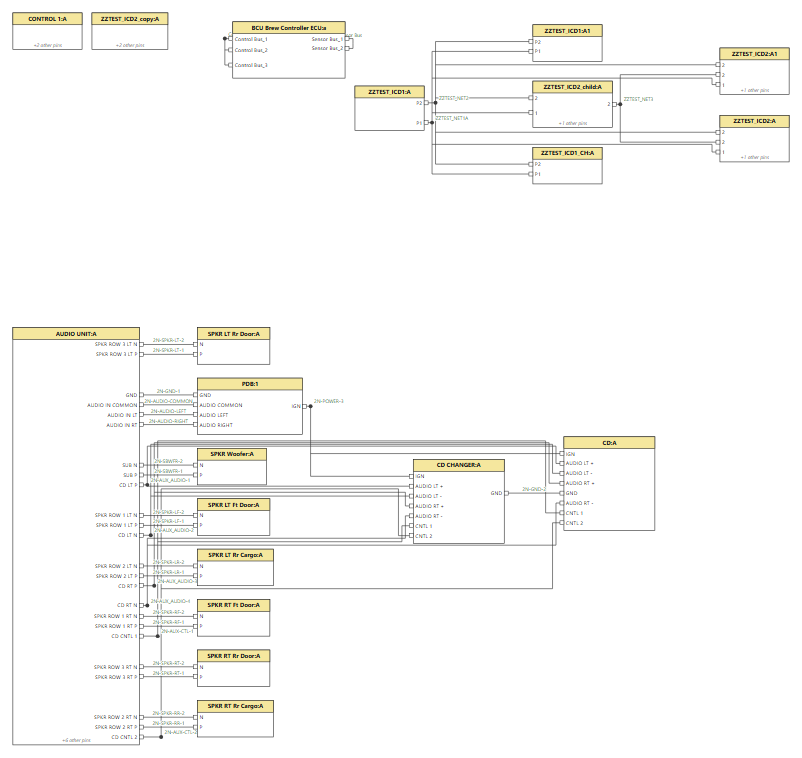
A drop-in replacement for the Device Modeler web app in Siemens Capital 2512, with the view the stock app never had: every ICD and its net connections on one diagram, pins facing each other, wires as straight as possible, filterable by applicability, project, effectivity and option expressions.
It installs as the same capitalwebapp.war at the same address (/devices/) on the Capital
Integration Server, talks only to Capital's own REST services, and keeps the Siemens original for a
one-command rollback. Version 0.9.5 is live on our Capital 2512.2608 server.
What it does
Everything the stock Device Modeler does. ICDs (create, edit, pins and nets, option expressions, applicability, release levels, copy, revise, descendants, harness footprint, backshell signals, import and export, table editor), the Component Library (devices, pins, footprints, supplier and customer part numbers, type code change) and the Dictionary. 40 stock functions are at parity, each exercised against live Capital and read back independently; the parity checklist has the evidence line by line, and the comparison sets stock and replacement side by side.
ICD Connectivity, which the stock app does not have:
- All ICDs on one diagram, or one ICD with its neighbours, or one net. Details for the selection and a From/To table underneath, exportable as CSV; the diagram exports as SVG.
- Straight, pin-facing wiring. Nets with three or more ends are drawn as a bus with tees, and no wire passes through a box. Drag any box and its wires re-route around it; saved views keep the positions.
- Filters for applicability, project, build list, effectivity and option expressions at ICD, pin and net level, plus "latest revisions only".
- Checks: nets that go nowhere, net names that nearly match, connections no combination of options allows, ends that never connect, effectivities that never overlap, duplicate or unwired pins, nets missing from the dictionary.
- Compare revisions of an ICD: fields, applicability, pins, nets and options, and which other ICDs are affected through the nets that changed.
- Grouping by applicability, project or role for large programs; the layout runs in background workers so the page stays responsive.
Supplyframe risk badges beside supplier part numbers and in the part picker, from Supplyframe DSI, through a same-origin forwarder on the Integration Server.
How it is proven
- Side by side with the stock app. The same actions driven through the unmodified Siemens app and through the replacement, every request recorded. A scripted comparison replays 23 stock writes across 11 operations through the replacement's own code: all match, with two accepted differences, each with its reason. A planted change is caught, so the comparison can fail.
- A built-in self-test on the live server writes throwaway objects, verifies each by an independent read-back, and includes two checks that must fail. Last run (0.9.4): 10 of 10.
- A contract check calls every Capital endpoint the app depends on, most of them outside Capital's published API, and compares the response shapes with a recorded snapshot: 14 of 14 match. Run before and after any Capital update; a watchdog notices if an update puts the Siemens app back.
Limits, stated plainly
- Tested on one Capital 2512.2608 install. A Capital update (2612) needs the contract check and self-test rerun before upgrading.
- The build-list filter and the XSD import are wired up but untested: no build lists or XSD sample on our install.
- Beyond about 100 ICDs in one ungrouped view wires start to share tracks; grouping is offered above 60 and stays clean.
- Capital desktop registers no URL protocol, so there is no direct link from the browser into Logic Designer or ConnectivityHub; a "Copy for ConnectivityHub" button copies what its Assign ICD picker needs.
Getting it
The expert package (war, install and rollback scripts, docs, comparison page, screenshots, source) is on Saber Lab Downloads for internal accounts. Installing restarts the Capital Integration Server, which signs every user out of Capital's web apps.